
Basic
$4.99 USD, paid once
10 credits
1 × 480p video
- Per video: 480p · 10 credits; 720p HD · 20 credits
- 13 seconds · Original sound
- Person or pet · 10 backgrounds
- Free Square & Silent exports
- No site watermark
- Credits never expire
THE MILLIONAIRE MEME · PET EDITION
One pet photo. The phone says “Get a job.” Upload your dog or cat, choose a background, and make a 13-second video with the original skit’s sound.
Vertical MP4 · 480p or 720p HD · 10 backgrounds · Fixed English caption
MADE HERE · EXACT INPUT + RESULT
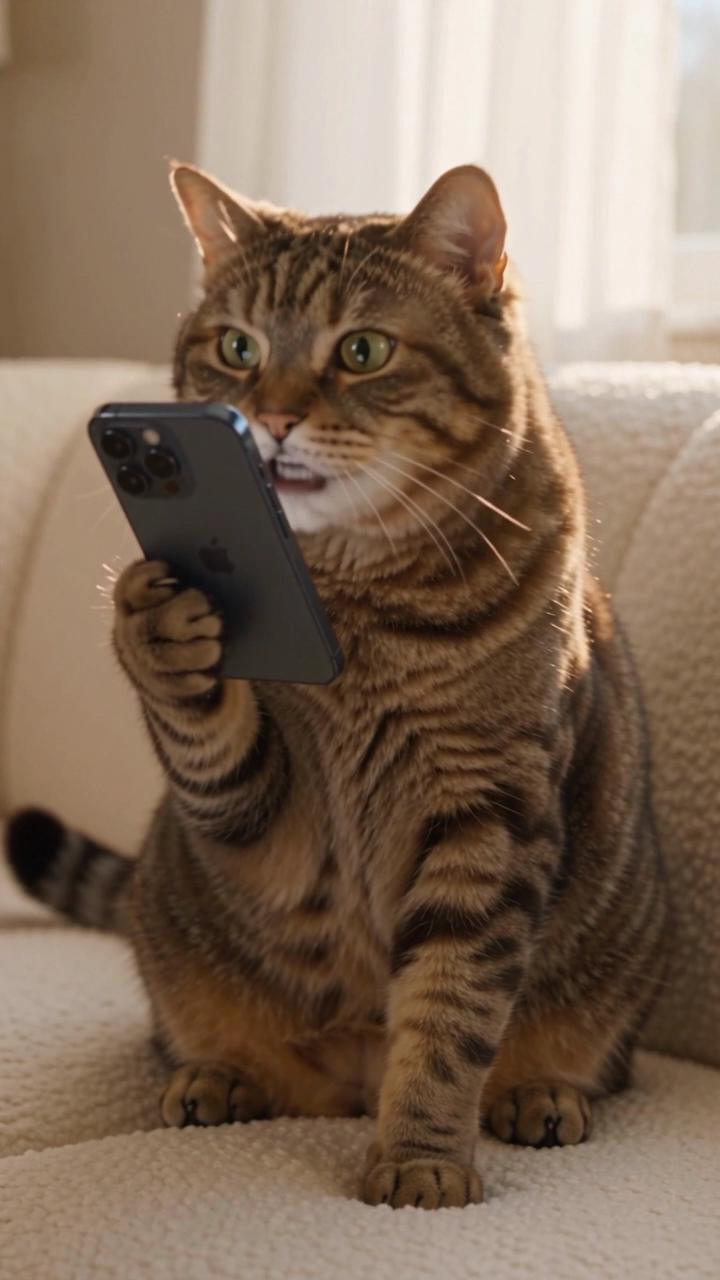
This prepared reference already shows a cat with a phone. The result demonstrates this input in Beach; it is not a test of every breed or an ordinary pet snapshot.
Play with sound and watch the paws, phone edges and mouth. Fast movement can blur details, and AI likeness can vary.
Your image supplies the appearance. The template supplies the performance, dialogue and timing. Start with the eyes, muzzle and markings you want to recognize.
Use one animal per image. Crop out other pets and people, especially anything overlapping the face.
Choose a sharp, well-lit photo with visible eyes, muzzle and ears. Avoid motion blur, dark rooms and filters that hide the fur.
Include the head and chest in a portrait or square image. A distant animal or tightly cropped face gives less appearance information.
JPEG, PNG or WebP · Up to 10 MB. A photo at least 600 pixels on each side gives a clearer reference.
The template puts the animal in the actor’s role, upright with a phone. The pose and surroundings can change. Compare the moving example before spending credits; exact paw movement and perfect lip sync are not guaranteed.
See the original meme and sourceThe English voice track and on-screen caption come from the skit. You do not choose a new voice or write new lines. Changing the page language does not translate the video.
Allow about 2–15 minutes. Your result page shows progress and saves the MP4 in My videos. Square and Silent exports from a completed result use no extra credits.
480p uses 10 credits. 720p HD uses 20. Both include the full 13-second skit with original audio and the fixed on-screen caption.
Credits never expire. Use them for yourself, a character, or your pet in any of the 10 backgrounds.
One-time payment. No subscription.
$4.99 USD, paid once
10 credits
1 × 480p video
$8.99 USD, paid once
20 credits
2 × 480p videos or 1 × 720p HD
$19.99 USD, paid once
50 credits
5 × 480p videos or 2 × 720p HD + 1 × 480p
Checking purchase availability…
Failed or cancelled renders return their credits automatically. Credit & refund policy
Want the full photo-to-download walkthrough and a closer look at the moving result?
Read the pet video guide (English)The Pet option accepts one dog or cat reference. Use a clear photo you own or have permission to use. The published cat example above lets you compare the input with its actual result.
The template supplies the phone performance. Our demonstrated cat input already has a phone, so it does not establish the same result from an unposed pet photo. Choose for a clear face and recognizable markings.
This maker uses the original English voice and fixed English caption. It has no custom script, voice selector or subtitle translation. A free Silent export lets you add your own sound in an editor.
Watching the example is free. A new 480p video uses 10 credits; 720p HD uses 20. Sign in to use or buy credits. Current one-time packs appear above, with no subscription.
Failed or cancelled generations return their credits automatically. A completed video can have imperfect likeness, mouth motion or paws; those variations do not automatically qualify for a refund. Watch the example and read the terms before buying.